Turn every enquiry into a clear next step.
LeadFlowUp captures new enquiries, keeps every opportunity visible, and handles booking, reminders and follow-up while your team stays in control of the important decisions.
Built for service businesses. Works with your website, email, calendar and the CRM tools already in your process.
Less chasing. Fewer missed leads. Clearer ownership.
LeadFlowUp handles the repetitive actions between the decisions your team needs to make, so a promising enquiry does not quietly disappear.
Respond while interest is fresh
New website enquiries are acknowledged and recorded without waiting for someone to copy details between inboxes and spreadsheets.
Know what happens next
Booking, proposal and follow-up information stays visible in one pipeline, with internal updates at the moments that matter.
Stop automation at the right time
When a customer replies, LeadFlowUp records the response and stops the remaining automated follow-ups so a person can take over.
A complete follow-up system, configured around your process.
Standard covers the common journey from enquiry to booking, proposal follow-up and human handover. Your business terminology, stages, messages, calendar and notification recipients are configured during setup.
Website enquiry capture
Creates the company, contact and opportunity in the CRM.
Customer acknowledgement
Sends a prompt confirmation when a new enquiry arrives.
Team notifications
Keeps the right people informed at key workflow stages.
Qualification and booking
Sends the correct booking path after the team qualifies a lead.
Proposal follow-up
Schedules structured Day 3, Day 7 and Day 12 follow-ups.
Reply detection
Records human replies and stops follow-ups that are no longer appropriate.
The same engine, adapted to your business language.
A site visit, consultation, measure and quote, assessment or discovery call may use different words, but the follow-up problem is usually similar.
A defined path from fit check to go-live.
Setup is not a collection of disconnected workflows. It is the process of configuring, connecting, testing and launching one managed system.
Lead follow-up automation delivered for GrowthEdge.
A live GoHighLevel project covering lead response, booking, no-shows, follow-up and internal sales notifications.

GrowthEdge
GoHighLevel lead follow-up, booking and sales workflow automation.
I worked with GrowthEdge to build and test follow-up automation across several stages of their sales process. The workflows covered form submissions, missed calls, booked discovery calls, no-shows and audit-stage actions.
- Partial-form and missed-call follow-up
- Booking confirmation and no-show recovery
- Email and SMS follow-up sequences
- Pipeline-stage logic and fallback testing
- Document status updates into private Slack
“Everything he’s built has run reliably without us needing to babysit it, and he flags issues early rather than letting them break later.”
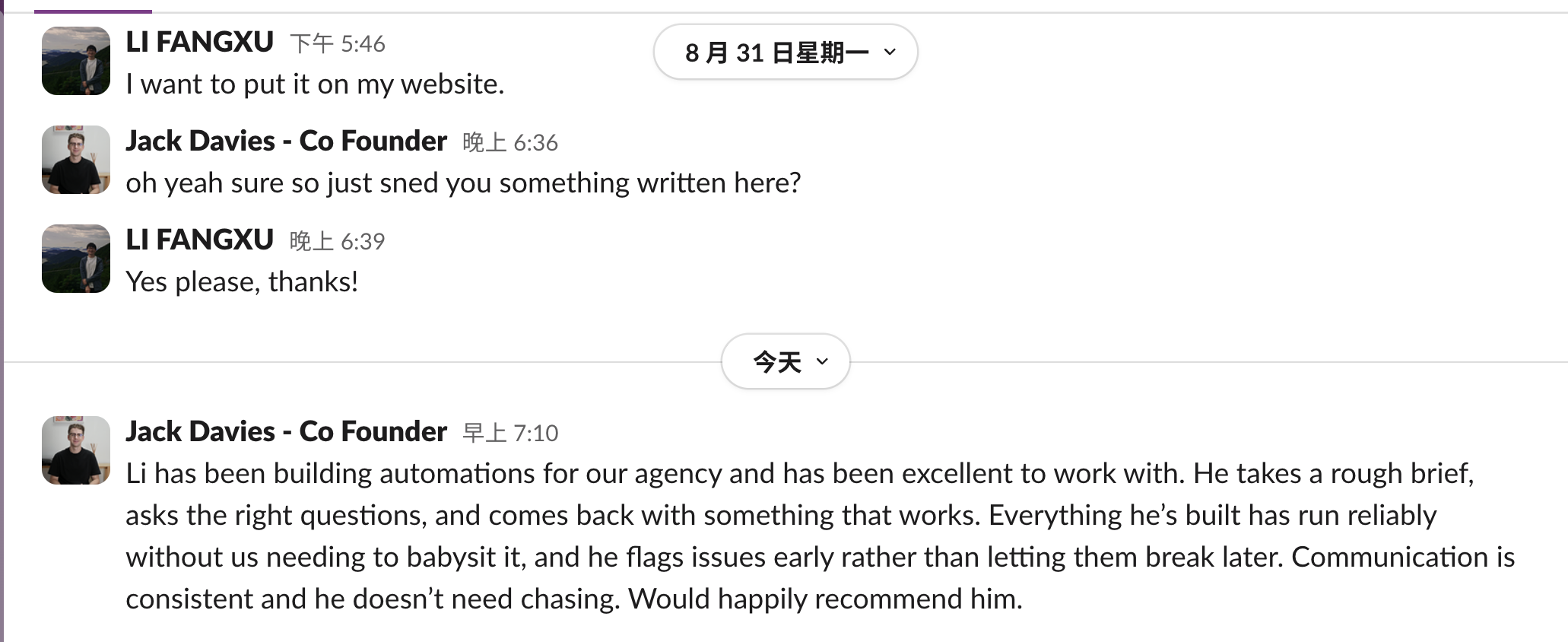 Open the full-size screenshot
Choose the right path for your current setup.
Standard is recommended for most service businesses. Teams with an established CRM or more complex operations can use an integration or custom workflow path without forcing the wrong system onto the business.
LeadFlowUp Standard
Best for service businesses that want one managed follow-up system.
A managed lead follow-up system for service businesses, configured and launched around one core enquiry-to-follow-up process.
- CRM workspace and pipeline configuration
- Website form, email and calendar connection
- Booking, reminders and proposal follow-up
- Reply detection and human handover
- Testing, launch support and team onboarding
- Hosting, monitoring, backups and maintenance
- Minor configuration changes within the agreed workflow
Additional business processes, new channels and complex integrations are scoped separately. Third-party subscription and messaging costs are not included.
CRM Workflow Integration
Best for teams that already have a CRM they want to keep.
Improve lead response, booking, reminders and proposal follow-up around your current CRM instead of replacing it.
- Keep your existing CRM and customer records
- Map the current lead and follow-up journey
- Connect suitable forms, email, calendar and notifications
- GoHighLevel proven; other systems fit-checked first
Integration scope depends on the CRM’s available API, webhooks and account access.
Custom Operations Workflow
Best for processes that go beyond one standard lead journey.
A tailored workflow and CRM setup for more complex operational needs, hand-offs and recurring customer activity.
- Multiple teams, locations, calendars or service lines
- Recurring service, inspection or renewal schedules
- Custom stages, roles, data and approval steps
- Specialist integrations and notification paths
Custom work is scoped only after the business process and technical requirements are understood.
See where your enquiries may be getting lost.
Send me your website and a few details about your current process. I’ll review the journey and email you a simple explanation or diagram showing where response, routing or follow-up could improve.
- Where new enquiries enter
- How quickly customers hear back
- Who needs to know internally
- What happens if a lead does not book
- What happens after a quote or proposal
LeadFlowUp questions.
What is LeadFlowUp?
LeadFlowUp is a configurable lead follow-up system for service businesses. It connects the steps between a new enquiry, CRM tracking, booking, proposal follow-up and human handover.
Do we need to replace all of our current software?
Usually not. Standard can be configured around the parts of your process that already make sense. If your team is established in another CRM, an integration path can be scoped instead of forcing a migration.
How long does setup take?
A Standard implementation is normally planned around one core lead journey. The exact timeline depends on the systems being connected, the availability of access and how quickly messages and stages are approved during setup.
What will you need from our team?
I will need one person who can confirm the current lead process, approve the messages and stages, and provide access to the agreed website forms, email, calendar and CRM tools.
What happens when a customer replies?
LeadFlowUp records a human reply and stops the remaining automated follow-ups for that sequence. The existing opportunity stage remains visible so the team can continue the conversation manually.
Can the stages, messages and follow-up timing be changed?
Yes. Business terminology, stage names, booking links, notification recipients, email wording and follow-up timing are configured during setup. Requirements outside the Standard scope can be quoted separately.
Want to see how this could fit your process?
Start with a free review of your current enquiry and follow-up journey.
LeadFlowUp provides managed lead follow-up automation for service businesses, including website enquiry capture, CRM pipeline setup, customer acknowledgement, team notifications, appointment booking, reminders, proposal follow-up, reply detection, GoHighLevel workflow integration, monitoring, backups and ongoing maintenance.